| Goto |
| Download |
| About Basic4GL |
| Demos and examples |
| Tutorials |
| Basic4GL Wiki |
| Discussion Forum |
| News | |
| 3-Jun-2006 Version 2.4.1 released New features:
|
|
| 18-Apr-2006 Version 2.3.5 released New features:
Bug fixes:
Editor enhancements:
|
|
| 20-Jan-2006 Version 2.3.4 released Add arbitrary axis rotation
matrix function: MatrixRotate(). |
|
| 28-Aug-2005 Version 2.3.3 released. Fixes a bug where standalone exes would crash when trying to load a transparent image. |
| Links |
| Other BASIC compilers |
| FreeBasic |
| Blitz Basic |
| Dark Basic |
| Pure Basic |
| DiNGS Game Basic |
| OpenGL enabled scripting languages |
| Python (with the Python OpenGL binding) |
| OpenGL resources |
| Nehe's OpenGL tutorials |
| OpenGL.org |

BASIC compiler for Windows with OpenGL
support
Created by Tom Mulgrew ([email protected])
Download Basic4GL
| Current version: | Download Basic4gl v2.4.1 | (Installer, 5.2MB) |
| Previous version: | Download Basic4GL v2.3.0 | (Installer, 4.4MB) |
| Source code: | Download source code (v2.3.3) | (Zip file, 1.5MB) |
Requirements
Windows 98 or later
(Probably works on Windows 95 with the OpenGL update too, but I haven't tested this).A 3D accellerated video card with OpenGL support.
What is Basic4GL?
Basic4GL is a free
BASIC programming language for Win32 platforms
with built in OpenGL v1.1 support.
 Basic4GL is a compiler and
virtual machine, using a easy, simple syntax based on
traditional BASIC. It is designed to be an easy to learn,
easy to use language for writing games, 3D demos and
utilities without all the setup hassle associated with
most language compilers.
Basic4GL was written for anyone who:
- Wants a free, easy to learn language to get into programming
- Wants to learn OpenGL, or wants an easy to use environment for playing around with OpenGL, testing out ideas, making concept prototypes, e.t.c
- Wants to write 3D games and demos.
Write 3D OpenGL programs
Basic4GL is built around the OpenGL 3D accellerated
graphics library. It automatically handles such tasks as
creating an OpenGL window and initialising OpenGL for
you, so you can skip all the usual linking, header file
and initialisation and start writing OpenGL code from
line 1.
For example, here's a complete, working OpenGL program in
Basic4GL
glBegin (GL_TRIANGLES) glVertex3f (0, 10, -30) glVertex3f (8, -4, -30) glVertex3f (-8, -4, -30) glEnd () |
Basic4GL comes with a number of Nehe tutorial programs (converted to Basic4GL format).
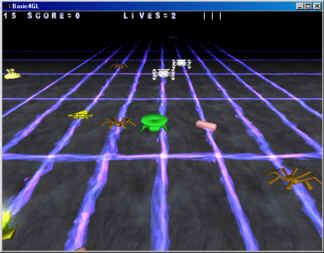 Vectors and matrices are
integrated directly into the Basic4GL language as 1D and
2D arrays respectively. Mathematical operators such as
multiplication (*) and addition (+) behave appropriately
on vector and matrix types, so you can write vector and
matrix notation algebra directly into your programs.
You also get a standard library of trig functions and
matrix creation routines (designed to mirror OpenGL's
matrix creation routines), which makes trigonometry
calculations quick, easy and compact to implement.
Write 2D programs
If you don't feel like writing OpenGL code or you just want to write some 2D sprite based games you can try Basic4GL's 2D sprite and tile engine. Use it to create 2D side scrollers, shoot-em-'ups, and animations without writing a line of OpenGL code.
Create your own games and demos
Once you've written your masterpiece, a few clicks will turn it into a stand-alone Windows executable file which you can distribute to whomever you want.
Program, test and debug from the same environment
 The Basic4GL programming
language is designed to be simple, flexible and very hard
to crash! Run-time errors (such as array index out of
bounds) are caught cleanly, and all resources (such as
textures or file handles) are automatically cleaned up
for you when the program finishes.
All editing takes place within the Basic4GL built in IDE,
consisting of a syntax highlighting editor and a full
symbolic debugger.
Basic4GL compiles and runs your changes in an instant, so
you can tweak and experiment until you're completely
satisfied (without having to reboot each time ;) without
ever having to leave the Basic4GL programming
environment.
So what isn't Basic4GL?
Basic4GL isn't my day job! :-)
It's an application written in my own time because I felt
like it.
As such it's not designed to compete with Blitz Basic, Dark Basic, Pure Basic, DiNGS Game Basic or any other commercial product. It doesn't compile to native machine code (if it did I'd be charging $$$ for it!), and Basic4GL is definitely not going to be the next C++!
Basic4GL was intended as a replacement for the old, free, beginner friendly, BASIC languages like QBasic/GWBasic that made programming accessible and easy to get into, but upgraded with some modern features to keep it relevant, up-to-date and interesting.
How can you help?
Basic4GL has come a long way, and a huge part of this is due to the support, suggestions, criticisms, code and tutorials contributed by users. To everybody who has helped out, thank you.
There are a number of ways you can help make Basic4GL a better program for everyone:
- The easiest is to just make a suggestion. E.g.
"Basic4GL would be so much better if it
had...".
The discussion forum is a good place for this. - Help out with the Basic4GL
Wiki.
We're currently working on moving the documentation and tutorial content of Basic4GL to Wiki format, so that anybody can help maintain the articles, extend them or add entirely new content. - Write up a demo/game/example for Basic4GL.
Basic4GL always needs some more new content to demonstrate what can be done and how.If it's something small, you can post it up in the discussion forum.
If it's something big, or contains custom graphics or other files, you can email it to me and I will add it to the demos and examples section.
With your permission I may even add it to the Basic4GL general release. - Write up a tutorial. 3D, sprites, general
programming, or whatever you feel would be useful
to others.
The Basic4GL Wiki is a good place to do this. - Make a PayPal donation.
Just a small amount of generousity makes me feel warm, fuzzy and appreciated.
Also keeps the website hosts from pulling the plug :)